You’re listening to music through the speakers connected to your PC or Mac, then move over to the couch or bed. A song comes on that you want to skip, the volume is too loud, or you just want to pause for a moment.
Some services, such as Spotify, let you control desktop playback directly from the mobile app. Many others only support casting to TVs, smart speakers, or other compatible devices.
Here’s how the major music streaming services compare when it comes to controlling playback on a PC or Mac from your phone.
Remote control support by music service
| Service | Built-in remote control | RemoTune |
|---|---|---|
| YouTube Music | ❌ No phone-to-PC/Mac playback control | ✅* |
| Apple Music | ⚠️ iPhone/iPad can control Music on Mac; Android cannot | ✅* |
| Spotify | ✅ Spotify Connect | ✅* |
| Amazon Music | ⚠️ Cast to Alexa-enabled devices; no PC/Mac remote | ✅* |
| SoundCloud | ⚠️ Chromecast, AirPlay, and other device playback; no PC/Mac remote | ✅* |
| Deezer | ❌ Deezer Connect remote control discontinued | ✅* |
| TIDAL | ⚠️ TIDAL Connect controls supported audio devices | ✅* |
| Pandora | ⚠️ Supports Chromecast and connected devices; no desktop remote | ✅* |
| Melon | ❌ No official mobile-to-PC playback remote found | ✅* |
* Available RemoTune controls depend on the media controls exposed by the player to Windows or macOS.
YouTube Music
YouTube Music can cast to Chromecast devices, TVs, and supported speakers, but its mobile app does not directly control playback that is already running in a regular browser on your PC or Mac.
With RemoTune, you can control the YouTube Music session that is already playing on the computer.
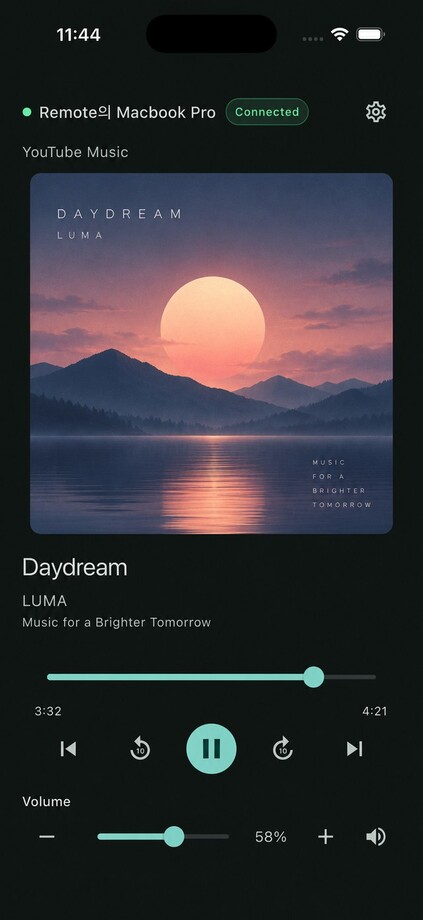
RemoTune remote illustration. The screen and available controls vary by device and player.
Step-by-step: control YouTube Music on your computer from your phone
Apple Music
If you use Apple Music on a Mac and have an iPhone or iPad, Apple’s iTunes Remote can control the Music app.
There is no Android version of iTunes Remote. If you use a Mac with an Android phone, RemoTune can provide the missing remote control.
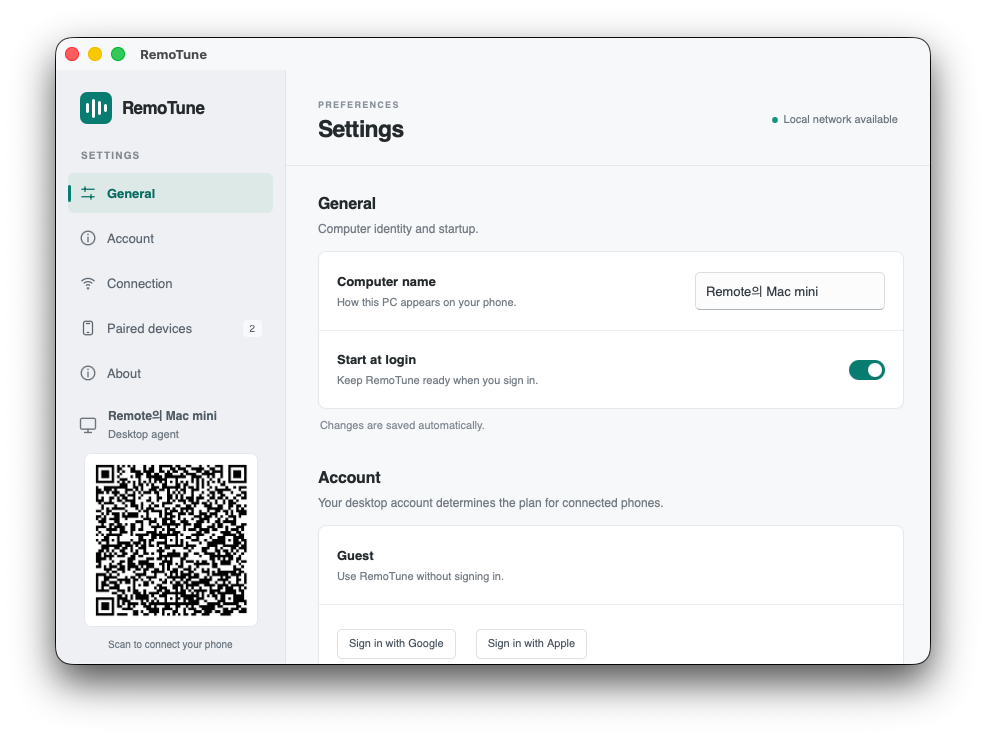
RemoTune settings on Mac. To connect, use the QR code displayed on your own computer.
Guide: control Apple Music on Mac from an Android phone
Spotify
Spotify already handles this very well with Spotify Connect.
You can select your PC or Mac from the Spotify mobile app and control playback, so Spotify users generally do not need another remote just for Spotify.
Amazon Music
Amazon Music can send playback from the mobile app to Echo and other Alexa-enabled devices.
It does not provide the same kind of phone-to-PC or phone-to-Mac remote control for music that is already playing on the computer.
SoundCloud
SoundCloud supports Chromecast, AirPlay, and a range of TVs and speakers.
Those features send or control playback on compatible devices. They do not turn the SoundCloud mobile app into a remote for a SoundCloud session already playing on your PC or Mac.
Deezer
Deezer previously offered Deezer Connect, which allowed a phone to control Deezer Desktop and the Web Player.
That remote-control feature was discontinued on May 6, 2025.
If you still want to control Deezer running on your computer from your phone, you now need another solution.
TIDAL
TIDAL Connect lets you choose and control supported speakers and audio systems from the TIDAL mobile app.
That is different from using your phone as a remote for the TIDAL player already running on a PC or Mac.
Pandora
Pandora supports Chromecast and a variety of TVs, speakers, and connected audio devices.
It does not provide a built-in mobile remote for controlling Pandora playback already running on a desktop computer.
Melon
Melon is available on both mobile and PC, but its official features do not appear to include direct mobile control of the playback session currently running on the PC.
If you listen to Melon on a computer and want to pause, skip tracks, or control playback from your phone, RemoTune can be used as the remote.
When your music service does not have a desktop remote
RemoTune does not connect to your music-service account. It controls compatible media that is already playing on your PC or Mac.
Depending on the player, you can use your phone to:
- Play or pause
- Go to the previous or next track
- Seek within the current track
- View the track title, artist, and album artwork
- Adjust or mute the PC or Mac volume
The audio stays on your computer. RemoTune does not stream the music to your phone.
Learn how to use the playback and volume controls
Get started
If your music service cannot control playback already running on your PC or Mac, try RemoTune.
Install RemoTune on the computer, connect your phone to the same local network, and keep listening through your usual speakers or headphones while using your phone as the remote.
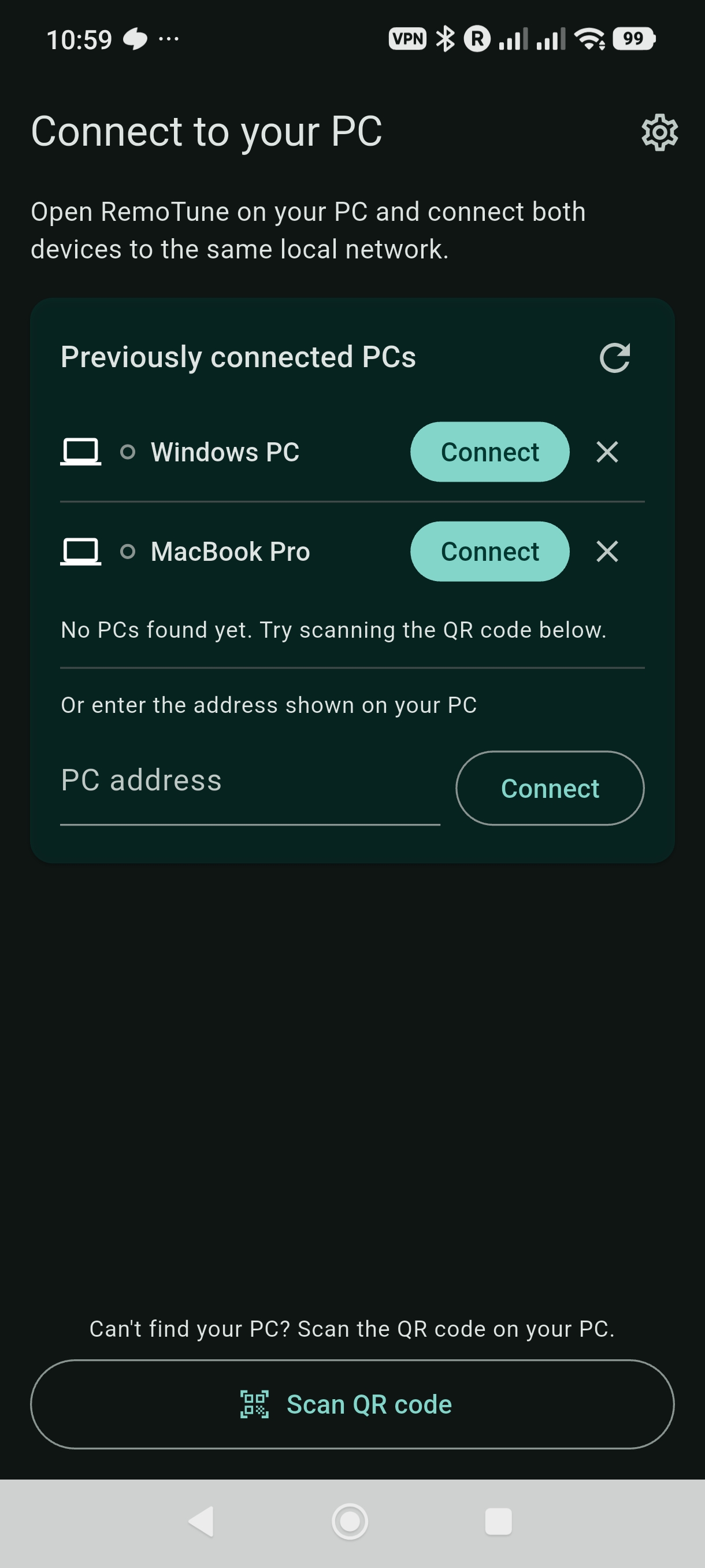
Example Android connection screen. Your phone and computer must be on the same local network.